Federal Benefits
CRA My Account Benefit Notice: What to Check Before You Call or Pay
Use this CRA My Account benefit notice checklist to review payment changes, recalculations, overpayment messages, documents, and next steps.

A CRA My Account benefit notice can mean several different things: a payment change, a recalculation, a document request, an overpayment, a direct deposit update, or a general account message. The important step is to slow down and read the notice inside the secure account before reacting to an email, text, or phone call.
This guide explains how to review a CRA My Account benefit notice in plain language. It is not tax advice, but it can help you organize the message, check which benefit is affected, and decide whether you need documents, a phone call, or simply a calendar reminder.
| What you see | Likely cause | First move |
|---|---|---|
| Payment amount changed | Income, family status, or recalculation update | Compare notice date with benefit period |
| Message says money is owed | Possible overpayment or adjustment | Check benefit name and explanation first |
| Notice requests documents | CRA needs proof before finalizing | List documents and deadline immediately |
| Email or text points to a notice | Could be a legitimate alert or a scam | Sign in directly, not through message links |
Start by Identifying the Benefit and Period
The first thing to find in a CRA My Account benefit notice is the benefit name. It may relate to a child or family benefit, GST/HST credit, provincial or territorial benefit, workers benefit, disability-related payment, or another tax credit. Then check the benefit period. A notice about a past period is different from a notice about upcoming payments.
Write down the notice date, benefit name, period, amount changed, and any deadline. This small step prevents confusion if you later call CRA or compare the notice with your bank deposits. Many benefit questions are easier to solve once the period is clear.
Do Not Use Links From Suspicious Messages
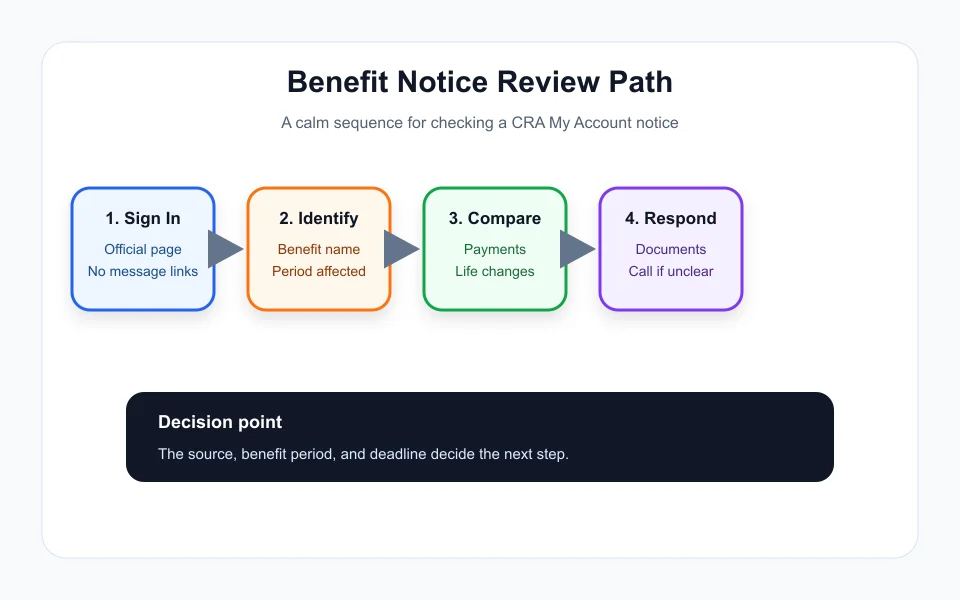
If an email or text says you have a CRA My Account benefit notice, do not click a payment or refund link from the message. Open a browser yourself and sign in through the official CRA sign-in page. This habit protects you from fake refund pages and urgent overpayment scams.
Inside the account, check whether the notice is actually there. If it is not, treat the outside message carefully. If it is there, read the full notice and compare it with your recent deposits, benefit calendar, and any letters you received by mail.
For related benefit timing and payment checks, keep these guides close: GIS Allowance Payment Dates 2026: What Seniors and Spouses Should Check, Canada Benefit Overpayment Notice: What to Check Before You Pay or Panic, BC Climate Action Tax Credit Payment Dates 2026: Why There May Be No Schedule, Alberta Child and Family Benefit Payment Dates 2026: What to Check, and GST/HST Credit Replaced by CGEB in 2026: What Actually Changes.
Understand Recalculation Before Assuming a Mistake
A CRA My Account benefit notice may appear because CRA recalculated benefits after a tax return, income update, marital status change, custody change, address update, or eligibility review. A recalculation can raise, lower, pause, or recover payments depending on the benefit and period.
Before calling, compare the numbers in the notice with your tax year, family status, and recent changes. If the notice mentions an overpayment, check whether it explains the reason and whether repayment is immediate, scheduled, or offset against future benefits.
When the Notice Requests Documents
Some notices ask for documents before a benefit can continue or before a question is resolved. The request may involve residency, marital status, child custody, income, school information, disability documentation, or direct deposit details. Read the deadline and submission method carefully.
Do not send extra documents that were not requested unless the instructions invite them. A clean response usually includes exactly what was asked for, labelled clearly, submitted through the correct channel, and saved for your records.
When to Call CRA
Call when the notice is unclear, the amount does not match your records, the deadline is close, you cannot access the required document, or the notice mentions repayment and you need options. Before calling, prepare your notice date, benefit name, period, last deposit amount, and any reference number shown in the account.
A CRA My Account benefit notice is easier to handle when you treat it like a checklist rather than an emergency. Confirm the source, identify the benefit, compare the period, gather documents, then decide the next step.
Quick Checklist
- Sign in directly through the official CRA page.
- Record the notice date, benefit name, benefit period, and deadline.
- Compare the notice with recent deposits and account changes.
- Gather only the documents requested.
- Call CRA if the explanation, amount, or repayment instruction is unclear.
Bottom Line
A CRA My Account benefit notice should be reviewed calmly and directly inside the secure account. Identify the affected benefit, check the period and deadline, then respond with the right documents or call with the notice details ready.
Frequently Asked Questions
What does a CRA My Account benefit notice mean?
It can mean a payment update, recalculation, document request, overpayment, account change, or general benefit message. Read the secure account notice for the exact reason.
Should I click a link from an email about a CRA notice?
No. Open the official CRA sign-in page yourself and check whether the notice appears inside your account.
What should I prepare before calling CRA about a benefit notice?
Have the notice date, benefit name, benefit period, amount, deadline, last payment, and any reference number ready before calling.
Official sources: CRA sign-in services · My Account for Individuals. Check current program pages before applying.